How to Cast String to Int Java: A Professional Guide
The Art of Type Conversion in Java
Data integrity is the cornerstone of robust software architecture. In the realm of Java development, one of the most frequent operations a programmer encounters is the necessity to transform textual data into numerical formats. This process, often colloquially referred to as how to cast string to int java, is not a simple matter of changing a label; it is a fundamental transformation of data types that requires precision, error handling, and an understanding of the underlying JVM mechanics.
While the term "casting" is frequently used by developers, it is technically a misnomer in this context. In Java, casting typically refers to converting one primitive type to another or navigating class hierarchies. Converting a String to an integer is actually a parsing operation. The String class represents a sequence of characters, whereas an integer represents a 32-bit signed two's complement value. Bridging the gap between these two distinct representations is a critical skill for any engineer dealing with user input, file I/O, or API responses.
Failure to handle this conversion with care can lead to catastrophic runtime exceptions, such as the dreaded NumberFormatException. A professional developer does not merely write code that works under ideal conditions; they write code that anticipates the messiness of real-world data. This article examines the technical methodologies, the architectural implications, and the best practices required to execute this conversion flawlessly within a production environment.
The Complete Overview of Casting String to Int Java
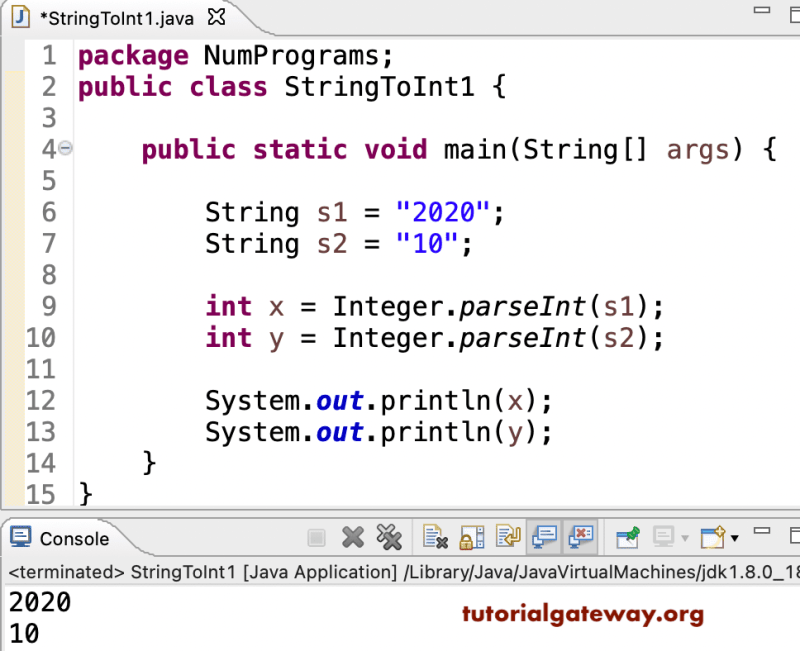
At its core, the requirement to convert a String to an integer arises because most external data sources—be they JSON payloads, command-line arguments, or text files—provide information in string format. To perform mathematical operations, comparisons, or logic-based indexing, this data must be translated into a primitive int. The primary mechanism for achieving this in the Java ecosystem is through the wrapper classes provided by the java.lang package, specifically the Integer class.
The process involves scanning the character array of the string, validating that each character conforms to a decimal digit, and then calculating the cumulative mathematical value based on positional notation. Because this process is computationally more expensive than simple primitive assignment, understanding the nuances of different methods—such as Integer.parseInt() versus Integer.valueOf()—is essential for writing high-performance, scalable applications.
Historical Background and Evolution
In the early iterations of Java, type conversion was strictly governed by the language's strong typing philosophy. The language designers prioritized safety, ensuring that implicit conversions (coercion) were minimized to prevent the subtle logic errors common in languages like C or JavaScript. As the language evolved from a small-scale application tool to the backbone of enterprise computing, the standard library was refined to provide more expressive and safer ways to handle string-to-numeric parsing.
The evolution of the Java Standard Edition (SE) brought about more sophisticated error-handling patterns and better integration with the Stream API. While the fundamental logic of parsing a string to an integer has remained consistent, the surrounding ecosystem has shifted toward functional programming styles. Modern Java developers now often handle these conversions within streams, utilizing optional wrappers to mitigate the risks of null pointer exceptions or malformed input, reflecting a broader industry move toward defensive programming.
Table of Contents
- The Art of Type Conversion in Java
- The Complete Overview of Casting String to Int Java
- Historical Background and Evolution
- Core Mechanisms: How It Works
- Key Benefits and Crucial Impact
- Major Advantages
- Comparative Analysis
- Future Trends and Innovations
- Conclusion
- Comprehensive FAQs
- Q: What is the difference between Integer.parseInt() and Integer.valueOf()?
- Q: Why does my code throw a NumberFormatException?
- Q: How can I convert a string to an int if it contains decimals?
- Q: Is there a way to convert a string to an int without using the Integer class?
- Q: How do I handle null strings when converting to an integer?
Core Mechanisms: How It Works
When a developer invokes a method to convert a string to an integer, the JVM initiates a sequence of validation and calculation steps. First, the method checks for nullity and then strips away any leading or trailing whitespace if the specific implementation allows. It then inspects the first character to determine if the number is negative (indicated by a minus sign) or positive. The engine then iterates through the remaining characters, ensuring each one falls within the Unicode range for '0' through '9'.
The actual mathematical conversion utilizes a technique where the current total is multiplied by ten and the value of the next digit is added. For example, converting "123" involves taking 1, multiplying by 10 to get 10, adding 2 to get 12, then multiplying by 10 to get 120, and finally adding 3 to reach 123. This iterative process continues until the end of the string is reached or an invalid character is encountered, at which point a NumberFormatException is thrown to signal the failure of the operation.

Key Benefits and Crucial Impact
Mastering the ability to effectively transform text into numbers allows developers to build interfaces that are both flexible and rigorous. By implementing correct parsing logic, you ensure that your application can consume diverse data formats while maintaining the strict mathematical integrity required for financial calculations, scientific modeling, or even simple gaming logic.
Furthermore, a deep understanding of this process enables better performance tuning. In high-throughput systems, such as high-frequency trading platforms or massive data processing pipelines, the overhead of string manipulation can become a bottleneck. Knowing when to use primitive parsing versus object-based parsing can significantly impact the latency and memory footprint of your software.
"In software engineering, the difference between a prototype and a production-ready system lies in the handling of edge cases and the precision of type conversions."
Major Advantages
- Data Integrity: Ensures that non-numeric input is caught immediately through structured exception handling, preventing corrupted data from entering the system.
- Type Safety: Leverages Java's strong typing to transition from the loosely defined String type to the strictly defined primitive int, reducing logic errors.
- Computational Readiness: Enables the use of mathematical operators and optimized arithmetic instructions that are unavailable for String objects.
- Memory Efficiency: Converting large volumes of numeric strings into primitive integers significantly reduces the heap memory overhead compared to storing them as objects.
- Standardization: Utilizing built-in methods like Integer.parseInt ensures that the parsing logic follows industry-standard Unicode and decimal rules.
Comparative Analysis
| Methodology | Return Type | Primary Use Case |
|---|---|---|
| Integer.parseInt(str) | primitive int | High-performance arithmetic and memory-sensitive operations. |
| Integer.valueOf(str) | Integer (Object) | When working with Collections like List<Integer> due to autoboxing. |
| Scanner.nextInt() | primitive int | Parsing structured input from files or user console input. |
| Custom Regex Parsing | Variable | Complex scenarios where numbers are embedded within specific patterns. |
Future Trends and Innovations
As we look toward the future of Java development, the way we handle data conversion is being influenced by the rise of GraalVM and ahead-of-time (AOT) compilation. These technologies aim to reduce the startup time and memory footprint of Java applications. Consequently, we can expect more optimizations at the bytecode level for common operations like converting string to int java, making these transitions even more seamless and performant in cloud-native environments.
Additionally, the integration of more advanced pattern matching in newer Java versions is changing how developers handle parsing results. Instead of traditional try-catch blocks, we are seeing a trend toward more functional, expression-based error handling. This shift will likely lead to cleaner, more readable codebases where the conversion from text to number is treated as a safe, predictable pipeline rather than a risky operation that might crash the application.
Conclusion
The ability to convert a string to an integer is a fundamental building block of Java programming. While it may appear trivial at first glance, the implications of how this is handled—ranging from performance considerations to robust error management—are profound. By understanding the distinction between parsing and casting, and by choosing the appropriate method for the specific context, developers can write code that is both efficient and resilient.
Ultimately, professional software development is defined by the attention paid to these foundational details. Whether you are building a simple command-line tool or a massive distributed system, mastering the nuances of data type transformation ensures that your application remains stable, predictable, and capable of handling the complexities of real-world data. Always prioritize validation, respect the constraints of the primitive types, and handle exceptions with the grace that modern enterprise software demands.
Comprehensive FAQs
Q: What is the difference between Integer.parseInt() and Integer.valueOf()?
A: The primary difference lies in the return type. Integer.parseInt(String s) returns a primitive int, which is more memory-efficient for direct mathematical operations. Integer.valueOf(String s) returns an Integer object. While Java's autoboxing makes them often interchangeable, using parseInt() is preferred when you do not need an object wrapper.
Q: Why does my code throw a NumberFormatException?
A: This exception occurs when the string being converted does not contain a parsable integer. Common causes include the string containing letters, special characters, decimal points (which require Double parsing), or being empty/null. Always validate your string using a regex or a try-catch block before attempting the conversion.
Q: How can I convert a string to an int if it contains decimals?
A: You cannot directly convert a string like "12.34" to an int using Integer methods. You must first parse it as a double or float using Double.parseDouble(str) and then cast that result to an integer: (int) Double.parseDouble(str). Note that this will truncate the decimal portion.
Q: Is there a way to convert a string to an int without using the Integer class?
A: While not recommended for production due to complexity and error potential, you could manually iterate through the characters of the string, convert each character to its numeric value using its ASCII/Unicode offset, and calculate the total. However, using the standard library is safer and more optimized.
Q: How do I handle null strings when converting to an integer?
A: Attempting to parse a null string will result in a NullPointerException. To prevent this, you should implement a null check or use a utility method like Objects.requireNonNull() or a ternary operator to provide a default value, such as: int value = (str == null) ? 0 : Integer.parseInt(str);
Leave a Comment
Comments are moderated before appearing. The data you submit is processed according to the Privacy Policy of cixa.org.