Essential Examples of Development Tools for Modern Engineering
The architecture of modern software is no longer built by hand with rudimentary text editors and manual compilation. Instead, it is constructed through a sophisticated ecosystem of specialized software designed to automate, optimize, and secure the lifecycle of code. For the professional engineer, the ability to navigate this landscape is as critical as the logic written in the source files themselves. Understanding the diverse array of examples of development tools is the baseline for achieving operational excellence in any technical domain.
Efficiency in software production is dictated by the synergy between human intelligence and machine-assisted workflows. When we examine the various categories of software construction aids, we see a clear trend toward abstraction. Developers are increasingly moving away from managing low-level machine instructions and toward high-level orchestration. This shift is facilitated by a robust suite of utilities that handle everything from version control and debugging to automated testing and deployment pipelines.
Selecting the right stack requires more than a cursory glance at popularity rankings. It demands an understanding of how different instruments interact within a continuous integration and continuous deployment (CI/CD) framework. A mismatch in tooling can lead to bottlenecks, technical debt, and fragmented communication within engineering teams. Therefore, analyzing specific examples of development tools becomes a prerequisite for designing scalable, resilient, and maintainable digital products.
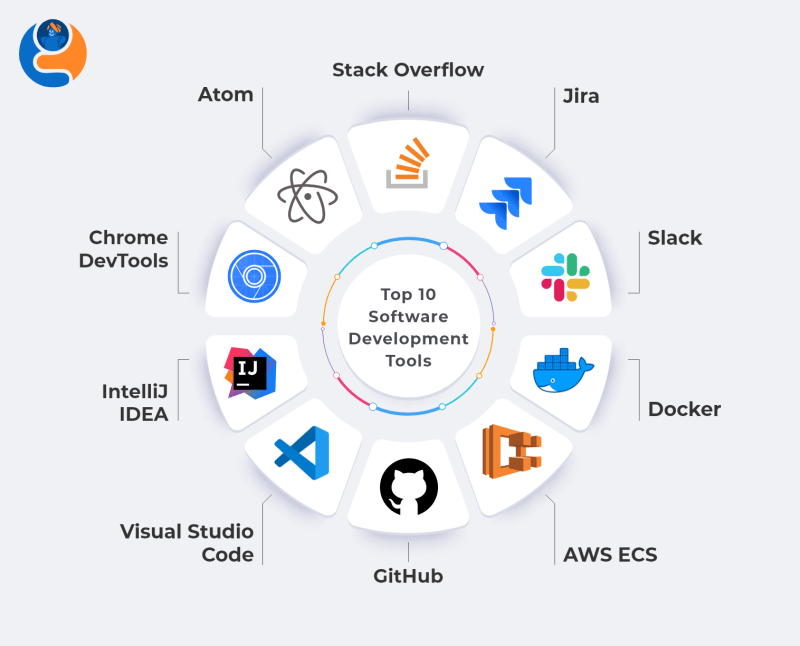
The Complete Overview of Development Tools
At its most fundamental level, the term encompasses any software, hardware, or platform that assists in the creation, testing, debugging, and maintenance of other software. These instruments act as force multipliers, allowing a single engineer to perform tasks that would have previously required an entire department. By providing structured environments and automated feedback loops, these systems reduce the cognitive load on the developer, allowing them to focus on complex problem-solving rather than repetitive syntax management.
The landscape is broadly categorized by the stage of the Software Development Life Cycle (SDLC) they address. Integrated Development Environments (IDEs) serve as the central workspace; version control systems manage the history and collaboration of code; compilers and interpreters translate human-readable logic into machine code; and testing frameworks ensure the integrity of the output. Recognizing these various examples of development tools allows teams to build a cohesive pipeline that supports rapid iteration without sacrificing stability.
Historical Background and Evolution
The history of software construction began in an era of extreme scarcity. In the early days of computing, "tools" were often physical hardware configurations or punch cards. Programming was a manual, error-prone process where a single misplaced character could require hours of physical reconfiguration. The evolution from these primitive methods to modern digital environments represents one of the most significant leaps in industrial productivity. The introduction of text-based editors in the mid-20th century marked the first major shift toward the abstraction we see today.
Table of Contents
- The Complete Overview of Development Tools
- Historical Background and Evolution
- Core Mechanisms: How It Works
- Key Benefits and Crucial Impact
- Major Advantages
- Comparative Analysis
- Future Trends and Innovations
- Conclusion
- Comprehensive FAQs
- Q: What is the difference between an IDE and a simple text editor?
- Q: Why is version control so critical in professional environments?
- Q: Can I use only one type of development tool?
- Q: How do AI-driven tools change the way developers work?
- Q: What are the best examples of development tools for beginners?
As computing power increased, the complexity of software grew exponentially, necessitating more sophisticated assistance. The 1970s and 80s saw the rise of specialized compilers and early debuggers, which allowed developers to step through logic in real-time. The subsequent emergence of the Internet and distributed computing in the 1990s and 2000s introduced the need for collaborative tools. This era birthed version control systems like CVS and eventually Git, which revolutionized how global teams could contribute to a single codebase simultaneously. Today, we are witnessing a third wave: the integration of artificial intelligence to predict errors and suggest code completions before the developer even finishes a thought.
Core Mechanisms: How It Works
The operational logic of these instruments relies on the principle of abstraction layers. For instance, a compiler works by parsing source code into an Abstract Syntax Tree (AST), analyzing its structure for semantic errors, and then transforming it into an intermediate representation or direct machine code. This mechanism ensures that the developer does not need to understand the specific electrical pathways of a CPU to write a functioning program. The tool acts as a sophisticated translator, bridging the gap between human intent and silicon execution.
Other tools, such as debuggers, operate through interception and state inspection. They attach to a running process, allowing the engineer to pause execution (breakpoints), inspect the current values of variables in memory, and observe the call stack. This level of granular visibility is what makes modern troubleshooting possible. Whether it is a containerization tool like Docker isolating environments or a CI/CD tool like Jenkins automating the movement of code from a repository to a production server, the core mechanism remains the same: providing a controlled, predictable interface for managing complexity.
Key Benefits and Crucial Impact
The implementation of a professional-grade toolset yields immediate dividends in terms of velocity and quality. Without these aids, software development would remain a linear, slow-moving process prone to human oversight. By automating the mundane aspects of coding—such as formatting, dependency management, and unit testing—engineers can dedicate their mental energy to architectural design and user experience. This shift from "writing code" to "engineering systems" is the primary driver of modern technological advancement.
Furthermore, the standardization provided by these tools fosters a culture of predictability. When an entire organization uses the same examples of development tools, such as standardized linting rules and deployment scripts, the "it works on my machine" phenomenon is largely eliminated. This consistency is vital for scaling organizations, where hundreds of developers must contribute to a shared ecosystem without causing catastrophic regressions.
"The quality of a software system is not merely a reflection of the code written, but a reflection of the processes and tools used to craft it."
Major Advantages
- Increased Development Velocity: Automation of repetitive tasks like compilation and testing allows for much faster release cycles.
- Enhanced Code Quality: Static analysis and automated testing tools catch bugs early in the development cycle, reducing the cost of remediation.
- Improved Collaboration: Version control and project management tools enable seamless, asynchronous work across global time zones.
- Reduced Human Error: Automated deployment pipelines ensure that the process of moving code to production is repeatable and free from manual mistakes.
- Scalability and Consistency: Containerization and orchestration tools allow applications to scale dynamically to meet user demand while maintaining a consistent environment.

Comparative Analysis
| Tool Category | Primary Function | Key Example |
|---|---|---|
| Integrated Development Environments (IDE) | Centralized coding, debugging, and editing environment. | Visual Studio Code, IntelliJ IDEA |
| Version Control Systems (VCS) | Tracking changes and managing collaborative code history. | Git, Subversion |
| Containerization & Orchestration | Packaging applications and managing their deployment at scale. | Docker, Kubernetes |
| Continuous Integration/Deployment (CI/CD) | Automating the testing and delivery of software updates. | Jenkins, GitHub Actions |
Future Trends and Innovations
Looking ahead, the trajectory of software assistance is moving toward deep integration with Large Language Models (LLMs). We are moving past simple autocompletion toward "AI Pair Programmers" that can understand high-level requirements and generate entire functional modules. This will not replace the engineer, but it will fundamentally change the nature of the role, shifting the focus from syntax and implementation to intent and verification. The ability to prompt a tool to build a scaffolded architecture will become a standard skill.
Additionally, we expect to see a surge in "No-Code" and "Low-Code" development tools that bridge the gap between business logic and technical execution. While these will not replace professional engineering, they will democratize the ability to build internal tools and prototypes. Simultaneously, the rise of "Platform Engineering" will see the creation of highly specialized internal developer platforms (IDPs) that abstract away the complexities of cloud infrastructure, providing developers with a seamless, self-service experience for all their operational needs.

Conclusion
The mastery of various examples of development tools is no longer optional for those seeking to excel in the modern technological landscape. These instruments are the bedrock upon which all digital innovation is built, providing the necessary structure to manage the inherent complexity of software systems. From the initial line of code written in an IDE to the final deployment managed by an orchestration engine, every step is empowered by a specialized set of utilities designed to ensure precision and speed.
As we move into an era defined by artificial intelligence and increasingly complex distributed systems, the importance of these tools will only intensify. The engineers who thrive will be those who view their toolset not as a static collection of software, but as a dynamic, evolving ecosystem. By staying informed about new advancements and understanding the deep mechanics of their chosen instruments, professionals can ensure they remain at the forefront of the digital revolution.
Comprehensive FAQs
Q: What is the difference between an IDE and a simple text editor?
A: A text editor is designed primarily for writing and editing plain text. While some advanced editors can be configured with plugins, an Integrated Development Environment (IDE) is a comprehensive suite that includes built-in tools for debugging, compiling, version control, and automated refactoring, all within a single interface tailored to specific programming languages.
Q: Why is version control so critical in professional environments?
A: Version control allows multiple developers to work on the same codebase simultaneously without overwriting each other's changes. It maintains a complete history of every modification, enabling teams to revert to previous versions if a bug is introduced and providing a clear audit trail of who changed what and why.
Q: Can I use only one type of development tool?
A: In practice, it is impossible to build professional software with just one tool. Software development requires a "stack" of different tools—an IDE for writing, Git for versioning, a compiler for translating, and various testing and deployment tools to ensure the software reaches the user reliably.
Q: How do AI-driven tools change the way developers work?
A: AI-driven tools act as intelligent assistants. They can suggest entire blocks of code, identify potential security vulnerabilities in real-time, and even help write unit tests. This allows developers to work at a higher level of abstraction, focusing more on architectural decisions and less on the minutiae of syntax.
Q: What are the best examples of development tools for beginners?
A: Beginners often benefit from user-friendly IDEs like Visual Studio Code, which has a vast library of extensions to help learn different languages. Learning basic Git commands and using simple testing frameworks are also essential first steps in understanding the professional development workflow.
Leave a Comment
Comments are moderated before appearing. The data you submit is processed according to the Privacy Policy of cixa.org.