How to Get Folder Size Linux: Pro Methods for Sysadmins

Managing Disk Space: The Precision of Linux File Analysis
System administrators and power users often encounter the sudden, critical reality of a full disk. Whether it is a runaway log file, an oversized container image, or a bloated cache directory, the ability to accurately determine how much space a specific directory consumes is a fundamental skill. In the Linux ecosystem, knowing how to get folder size linux effectively is not merely about running a single command; it is about understanding the nuances of file system reporting, block allocation, and human-readable formatting.
The challenge lies in the distinction between the size of individual files and the aggregate size of a directory. A directory is essentially a pointer to other files and subdirectories. To calculate the total footprint, the operating system must traverse the entire tree structure, summing the actual blocks allocated on the disk. This process can be resource-intensive on large-scale enterprise storage or networked file systems, requiring a strategic approach to command execution to avoid unnecessary I/O overhead.
This technical exploration moves beyond basic syntax. We will examine the standard utilities used by professionals, the differences between various measurement methodologies, and how to interpret the data provided by the kernel. By the end of this analysis, you will possess the technical literacy required to audit any Linux file system with surgical precision, ensuring optimal storage health and performance.
The Complete Overview of Getting Folder Size Linux
At its core, the task of determining directory volume involves querying the filesystem metadata. In Linux, every file and directory is represented by an inode, which contains information about the file's size, permissions, and ownership. However, the inode itself does not store the total size of a directory's contents; instead, it stores the size of the directory entry itself. To get the total size of a folder, a utility must recursively visit every child object within that path and aggregate their individual sizes.
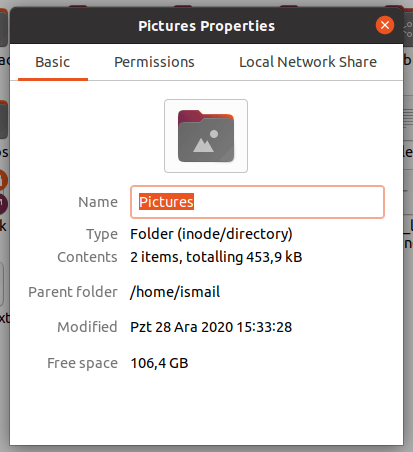
There are two primary ways to approach this: the command-line interface (CLI) and the graphical user interface (GUI). For remote server management via SSH, the CLI is the only viable option. For local workstation management, a GUI provides a visual hierarchy that can be more intuitive for quick audits. However, the CLI remains the gold standard for accuracy, speed, and automation, allowing users to pipe output into other tools for complex data processing.
Historical Background and Evolution
The evolution of disk usage utilities tracks closely with the development of the Unix philosophy. In the early days of computing, storage was a scarce and expensive resource. The primitive tools developed in the 1970s and 1980s were designed for minimal overhead, focusing on providing raw byte counts to users. As file systems evolved from simple structures to complex, journaling systems like Ext4, XFS, and Btrfs, the methods for calculating size had to adapt to account for sparse files, compression, and block-level complexities.
The introduction of the `du` (disk usage) utility became the cornerstone of Linux storage management. Initially, these tools provided cryptic, unformatted numbers that required manual calculation. As the Linux community matured, the demand for "human-readable" output—converting raw bytes into Kilobytes, Megabytes, and Gigabytes—led to the implementation of flags that revolutionized how administrators interact with their data. This shift from raw data to actionable information marked a significant milestone in user-centric system design.
Table of Contents
- Managing Disk Space: The Precision of Linux File Analysis
- The Complete Overview of Getting Folder Size Linux
- Historical Background and Evolution
- Core Mechanisms: How It Works
- Key Benefits and Crucial Impact
- Major Advantages
- Comparative Analysis
- Future Trends and Innovations
- Conclusion
- Comprehensive FAQs
- Q: What is the most common command to get folder size linux?
- Q: Why does 'du' show a different size than 'ls'?
- Q: How can I find the largest folders in a specific directory?
- Q: Is there a visual way to check folder size on a Linux terminal?
- Q: How do I check the size of a folder without including other mounted filesystems?
Core Mechanisms: How It Works
When you execute a command to get folder size linux, the utility typically performs a recursive walk of the directory tree. It uses system calls like `stat()` or `lstat()` to retrieve the metadata for each inode encountered. The `stat` system call returns the size of the file in bytes. The utility then accumulates these values into a running total. It is important to note that the "apparent size" of a file (the actual data it contains) may differ from its "disk usage" (the actual number of blocks allocated on the physical media).
This distinction is critical when dealing with sparse files—files that contain large blocks of zeros that do not occupy physical disk space. A sophisticated administrator knows that a sparse file might report an apparent size of 10GB but only consume 1MB of actual disk blocks. High-level tools must be able to distinguish between these two metrics to provide an accurate picture of remaining storage capacity and prevent misinformed decisions during disk expansion or cleanup operations.
Key Benefits and Crucial Impact
Proficiency in measuring directory footprints has a direct impact on system stability. In production environments, especially those running microservices or large databases, an unexpected spike in disk usage can lead to service outages, database corruption, or the failure of critical logging processes. Being able to rapidly identify the source of growth is the difference between a five-minute fix and a multi-hour outage.
Furthermore, understanding these metrics is essential for cost management in cloud-native environments. In platforms like AWS, Azure, or Google Cloud, storage is billed based on provisioned capacity or actual usage. By utilizing precise methods to get folder size linux, organizations can optimize their storage tiers, prune unnecessary data, and significantly reduce monthly operational expenditures.
"Efficiency in system administration is not measured by how much you can do, but by how accurately you can measure what is being done."
Major Advantages
- Rapid Incident Response: Quickly identifying "space hogs" allows for immediate remediation during critical storage shortages.
- Resource Optimization: Enables precise planning for hardware upgrades or cloud storage scaling by providing accurate growth trends.
- Automated Maintenance: Command-line tools can be integrated into cron jobs to alert administrators when specific directories exceed defined thresholds.
- Granular Visibility: Advanced flags allow users to see not just the total size, but a breakdown of size by file type or depth.
- Cost Control: Accurate auditing prevents the over-provisioning of expensive high-performance storage in enterprise environments.
Comparative Analysis
| Methodology | Primary Use Case | Key Advantage |
|---|---|---|
| Command Line (du) | Remote Server/Automation | Extremely fast and scriptable |
| GUI (File Managers) | Local Desktop Workstations | Visual and intuitive for beginners |
| NCurses Tools (ncdu) | Interactive Cleanup | Real-time, navigable interface |
| Python/Scripting | Custom Reporting | Highly customizable logic and output |

Future Trends and Innovations
As we move toward an era of massive data volumes and distributed file systems, the way we measure storage is changing. We are seeing a shift from local, single-node measurements to distributed observability. In Kubernetes and containerized environments, the concept of "folder size" is expanding to include ephemeral storage within containers and persistent volumes across a cluster. Future tools will likely integrate more deeply with telemetry frameworks, providing real-time streaming of directory growth metrics directly into monitoring dashboards like Prometheus or Grafana.
Additionally, the rise of intelligent, AI-driven storage management suggests a future where systems do not just report size, but predict it. Instead of a user manually running a command to get folder size linux, the operating system will use machine learning models to analyze historical growth patterns and proactively suggest cleanup actions or trigger automated scaling events before a disk reaches capacity. The transition from reactive measurement to proactive intelligence is the next frontier in Linux storage management.
Conclusion
Mastering the ability to get folder size linux is a foundational requirement for anyone serious about system administration, DevOps, or data management. From the simple `du -sh` command to the interactive power of `ncdu`, the tools available in the Linux ecosystem provide a spectrum of solutions tailored to different operational needs. Understanding the underlying mechanics—the relationship between inodes, blocks, and apparent size—ensures that you are not just running commands, but interpreting data with professional accuracy.
As storage technologies continue to evolve, the principles of efficient auditing remain constant. Whether you are managing a single Raspberry Pi or a massive distributed cloud architecture, the precision of your measurements dictates the stability of your systems. Approach disk management with a methodical mindset, leverage the right tool for the specific context, and always prioritize the distinction between logical file size and physical disk consumption.
Comprehensive FAQs
Q: What is the most common command to get folder size linux?
A: The most common and standard command is du -sh [directory_name]. The -s flag stands for "summary," which prevents the command from listing every single subfile, and the -h flag stands for "human-readable," which converts the output into KB, MB, or GB for easier reading.
Q: Why does 'du' show a different size than 'ls'?
A: This is a frequent point of confusion. The ls command typically shows the size of the directory file itself (the metadata), which is usually a small, constant value (like 4KB). The du command, however, traverses the contents of the directory and calculates the sum of all files within it. To see file sizes with ls, you must use ls -lh, but even then, ls does not recursively sum directory contents like du does.
Q: How can I find the largest folders in a specific directory?
A: To find the largest subdirectories within a folder, you can use the command du -h --max-depth=1 | sort -hr. This command calculates the size of directories one level deep, sorts them in reverse order (largest first), and presents them in a human-readable format. This is an essential workflow for cleaning up cluttered file systems.
Q: Is there a visual way to check folder size on a Linux terminal?
A: Yes, the most highly recommended tool is ncdu (NCurses Disk Usage). It provides an interactive, text-based interface that allows you to navigate through your directory tree using arrow keys, seeing exactly which folders are consuming the most space in real-time. It is much faster and more intuitive than parsing raw du output.
Q: How do I check the size of a folder without including other mounted filesystems?
A: If you are running a command on a directory that contains mount points for other drives or network shares, you can use the -x or --one-file-system flag with the du command. This tells the utility to stay within the boundaries of the current filesystem, preventing it from accidentally scanning massive external drives or network mounts.
Leave a Comment
Comments are moderated before appearing. The data you submit is processed according to the Privacy Policy of cixa.org.